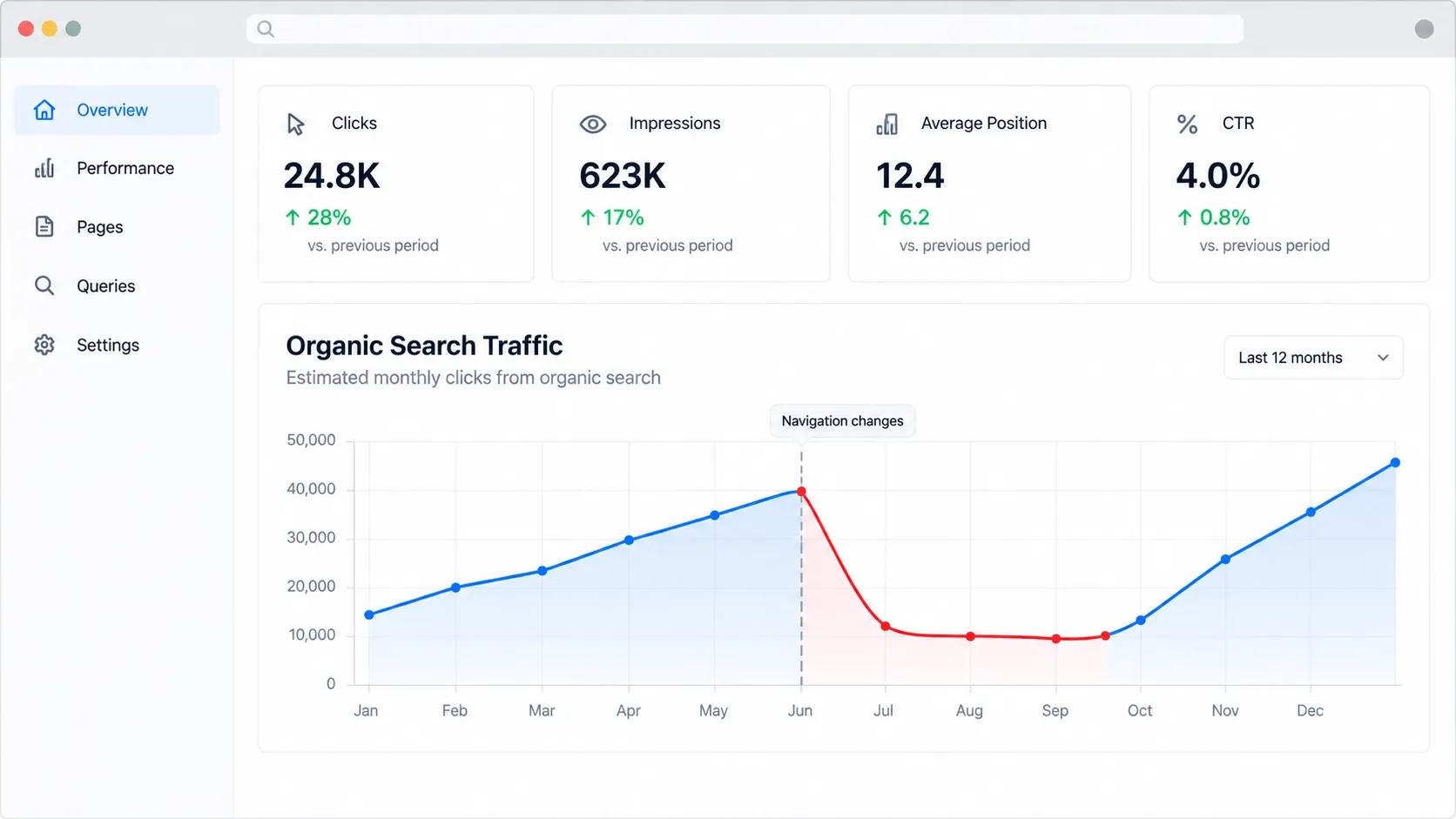
SEO for website redesign means protecting a website’s search rankings, organic traffic, and visibility while updating its design, content, or structure. A successful redesign should improve the user experience without unnecessarily losing the SEO value the website has already built.
Changes to URLs, page content, internal links, and technical settings can affect search performance. With proper planning, businesses can reduce these risks and launch a modern website while maintaining a strong foundation for organic growth.
Why Website Redesigns Can Affect SEO Rankings
Search engines use website content, links, URLs, and technical signals to understand and rank pages. When a redesign changes these elements, search engines may need to recrawl and reassess the affected pages.
Common causes of ranking drops include:
- URL changes: Old pages become inaccessible when redirects are missing or incorrect.
- Content removal: Deleting useful information can reduce a page’s relevance to existing search queries.
- Broken internal links: Important pages become harder for visitors and search engines to discover.
- Technical errors: Incorrect indexing settings or canonical tags can prevent pages from appearing properly in search results.
- Performance issues: Poorly optimized images, scripts, or layouts can create loading and usability problems.
A redesign does not automatically harm SEO. The risk comes from changes that reduce a page’s accessibility, relevance, or usefulness. Preserving valuable elements while improving the website is the most practical approach.
How to Prepare Your Website for an SEO-Safe Redesign
SEO preparation should begin before design and development work starts. Reviewing the existing website helps you identify which pages need protection and establishes a baseline for measuring the redesign's results.
Audit Existing Rankings, Organic Traffic, and Conversions
Use Google Search Console and your analytics platform to identify pages that attract organic visitors, rank for valuable keywords, or generate leads. Record clicks, impressions, landing-page traffic, and conversions.
Pay particular attention to service pages and landing pages that contribute directly to business inquiries. A page with relatively little traffic may still be valuable if it consistently attracts qualified prospects.
Crawl the Current Website and Document Important URLs
Use an SEO crawler to collect existing URLs and review their status codes, page titles, meta descriptions, headings, canonical tags, and indexability settings.
Identify broken links, duplicate pages, redirect chains, and important URLs that must remain accessible. This crawl provides a reference for comparing the existing website with the redesigned version and helps prevent valuable pages from being overlooked.
Identify High-Performing Pages and Backlinks
Review pages with strong organic performance, relevant backlinks, and consistent conversions. These pages deserve particular attention during the redesign because changing their URLs or removing their content unnecessarily can disrupt their existing search value.
When a page needs updating, preserve its core purpose and useful information wherever possible. If it must move to a new URL, plan a relevant redirect before launch.
Benchmark Current SEO Performance
Save reports covering organic traffic, priority keyword rankings, conversions, and indexing status. Record the reporting period so you can compare equivalent timeframes after launch.
This baseline makes it easier to identify meaningful changes and investigate potential problems instead of relying on assumptions about whether the redesign improved performance.

How to Create an SEO-Friendly Website Redesign Plan
A website redesign plan should connect design decisions with SEO requirements. Designers, developers, and content teams should agree on which URLs, content, and technical elements need to be preserved before implementation begins.
Build a Complete URL Mapping Spreadsheet
Create a spreadsheet that maps each existing URL to its intended destination on the redesigned website. Include the planned action for each page, such as keeping the URL, updating the content, redirecting it, or evaluating it for removal.
For example, if an existing service page moves to a new URL, document the old address and the exact replacement. This makes redirect implementation and testing easier and reduces the risk of losing important pages during launch.
Preserve High-Value Content and Search Intent
Do not remove useful content simply to create a cleaner design. Review service descriptions, FAQs, supporting information, and location-specific content before deciding what to rewrite or delete.
Improvements should preserve the original purpose of each page unless there is a clear reason to change it. For example, a page targeting customers looking for remodeling services should continue to address that need rather than becoming a general overview of home improvement.
You can also improve existing pages by following these content optimization practices for SEO.
Plan the New Website Architecture and Internal Links
Organize the redesigned website so visitors can easily find important services and information. Keep navigation logical and ensure priority pages remain accessible through relevant internal links.
For example, a construction company's website might connect its homepage to remodeling services, individual service pages, project galleries, and contact information. These connections help visitors navigate the website and help search engines discover related pages.
How to Protect URL Structures and Manage Redirects
Keeping existing URLs is often the simplest option when a page's purpose and content remain substantially the same. Changing URLs solely for cosmetic reasons can create additional work without guaranteeing an SEO benefit.
When a URL must change, implement a permanent 301 redirect from the old address to the most relevant replacement. This helps visitors reach the correct page and signals that the page has moved permanently.
Follow these practices:
- Redirect each changed URL directly to its final destination.
- Avoid redirect chains and redirect loops.
- Update internal links to point to the new URLs.
- Do not redirect unrelated pages to the homepage.
- Test redirects before and after launch.
If a page has no suitable replacement, evaluate whether it should return a 404 or 410 status instead of redirecting visitors to unrelated content. After implementation, test important redirects and confirm that their destinations return the expected status codes.
Preserve On-Page SEO During a Website Redesign
A new visual design should not automatically replace the on-page SEO elements that already support search visibility. Review important pages to ensure their titles, descriptions, headings, images, and content remain relevant.
Focus on the following elements:
- Title tags and meta descriptions: Keep them descriptive and aligned with each page's purpose.
- Heading structure: Maintain a logical hierarchy that helps readers understand the content.
- Images: Optimize file sizes and use appropriate alt text for meaningful images.
- Page content: Preserve useful information that satisfies the audience's search intent.
- Internal links: Update links when URLs change and retain connections to important pages.
- Canonical tags: Ensure each page identifies the correct preferred URL.
Review content changes carefully. Combining pages, removing FAQs, or shortening service descriptions can change the information a page provides. Make these decisions based on usefulness and search intent rather than assuming that less content always produces better rankings.
Technical SEO Checks Before Launching the Redesigned Website
Test the redesigned website in a staging environment before publishing it. A website may look complete while still containing technical settings that interfere with crawling, indexing, or performance.
Test Robots.txt, XML Sitemaps, and Meta Robots Directives
Check that robots.txt does not block important sections of the live website. Ensure pages intended to appear in search results do not have accidental noindex directives.
The XML sitemap should contain the correct canonical URLs for pages you want search engines to discover. Remove obsolete URLs, redirects, and pages that should not be indexed.
Check Mobile Usability and Core Web Vitals
Test navigation, buttons, forms, and content across mobile devices and screen sizes. Visitors should be able to access important information without unnecessary scrolling or layout problems.
Review Core Web Vitals to identify performance issues. Google's recommended thresholds are:
- Largest Contentful Paint (LCP): 2.5 seconds or less.
- Interaction to Next Paint (INP): 200 milliseconds or less.
- Cumulative Layout Shift (CLS): 0.1 or less.
These thresholds apply at the 75th percentile of page visits. Use Google's Core Web Vitals guidance to understand the measurements and identify potential improvements.
Verify HTTPS, Structured Data, and Canonical URLs
Confirm that HTTPS works correctly and that internal links point to secure URLs. Review canonical tags to ensure they reference the intended preferred pages.
If the website uses structured data, check that the markup remains accurate after page templates or content change. Valid structured data can help search engines understand a page, although it does not guarantee enhanced search results.
Prevent Accidental Noindex Directives and Crawl Blocks
Staging websites often use password protection or noindex directives to prevent premature indexing. These restrictions must be reviewed before launch.
Confirm that the live website is accessible to search engines and that important pages do not retain development restrictions. Test representative URLs after deployment to verify their accessibility and indexability.

How to Monitor SEO Performance After a Website Redesign
SEO monitoring should continue after launch because search engines need time to recrawl changed pages, process redirects, and reassess updated content. Some fluctuations are normal, but persistent declines deserve investigation.
During the first few days, confirm that the website is accessible, redirects work, analytics are recording data, and important pages can be crawled. Continue monitoring performance over the following weeks.
Use Google Search Console to track clicks, impressions, search queries, and indexing issues. Compare organic traffic and conversions with your pre-redesign baseline using consistent reporting periods.
Avoid making several major changes at once without identifying the likely cause. A structured investigation makes it easier to isolate problems and choose the appropriate fix.
For businesses that depend on organic leads, ongoing SEO services can help monitor search performance, maintain technical health, and identify opportunities for improvement after a redesign.
Conclusion
Protecting SEO during a website redesign requires preparation, careful implementation, and consistent monitoring. Preserve valuable URLs and content, map redirects accurately, maintain on-page SEO, and test technical settings before publishing the new website.
A successful redesign should improve the experience for visitors without unnecessarily sacrificing organic visibility. If you are planning a redesign, 1REALTOUR can help you plan a website that supports usability, performance, and long-term growth.
Share this article