Learning how to create a blog website helps you share ideas, grow an audience, and build an online presence. A blog can support your business, strengthen your personal brand, or help you earn through content. Before you start the actual setup, understanding your topic, platform, and goals makes the whole process easier. With a clear plan, you can build a blog that is simple to manage, easy to navigate, and ready to grow.
Understanding What You Need Before Starting a Blog
Before you create a blog website, you need a clear direction. Your topic, setup, and platform choices shape how your blog grows and how readers interact with your content. When these basics stay aligned, your blog becomes easier to build and more effective in the long run.
Choose Your Blog Topic and Audience
Start by choosing a topic you enjoy and understand. This helps you create helpful content that readers trust. Define who your audience is, what they want to learn, and why they would visit your blog. A focused topic gives your blog a clear identity and helps you stand out.
Pick a Blogging Platform
Your platform controls how you design, write, and manage your blog. WordPress, Wix, and other platforms offer different levels of control. Choose one that fits your skills and long-term goals. A good platform makes your blog easy to update and flexible enough to grow.
Set Clear Goals for Your Blog
Decide why you want to create a blog website. You may want to share knowledge, attract clients, build authority, or earn income. Clear goals help you choose the right structure, design, and content plan. With strong goals, your blog becomes more organized and more successful.
Choose the Right Platform to Create a Blog Website
The platform you choose shapes how your blog looks, performs, and grows. Each platform offers its own tools, templates, and level of control. When you choose the right one, you make it easier to manage your blog and publish new content without stress.
WordPress
WordPress is the most popular blogging platform because it gives full control over design, plugins, and features. It works well for beginners and advanced users. You can customize your blog in many ways, grow at your own pace, and add tools whenever you need them.
Wix
Wix offers a simple drag-and-drop editor that helps beginners create a blog website quickly. You can choose templates, add sections, and design pages without coding. It is ideal for users who want a clean and easy setup.
Squarespace
Squarespace focuses on clean designs and ready-made layouts. It works well for bloggers who want a stylish website with built-in tools. It includes templates, hosting, and design features that help you launch without technical setup.
Blogger
Blogger is a free and simple platform owned by Google. It helps beginners start writing fast. While it offers fewer customization options, it works well if you want a basic blog with easy management.
Which Platform Works Best for Beginners
Beginners often choose WordPress or Wix because both offer strong tools and easy setup. WordPress gives long-term flexibility, while Wix provides a simple editor. Both options help you create a blog website without stress and support steady growth.
Register Your Domain and Choose Hosting
Before your blog goes live, you need a domain name and hosting plan. These two pieces make your blog visible on the internet. A strong domain and reliable host help users reach your website quickly.
How to Pick a Domain Name
Choose a domain name that is short, clear, and easy to remember. Avoid numbers and hyphens. Use words that match your blog topic so users understand your niche right away. A good domain helps build trust and makes your brand easier to recognize.
Types of Hosting for Beginners
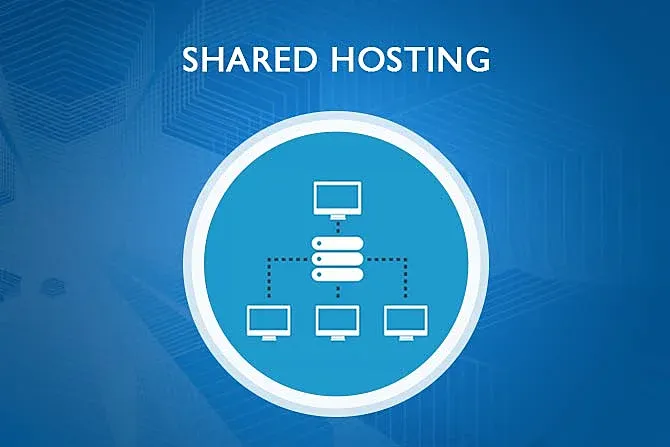
Beginners often start with shared hosting because it is affordable and simple. As your blog grows, you can move to VPS or cloud hosting for more speed and control. The right hosting type helps your website stay stable and load fast.
What to Look for in a Hosting Provider
Choose a hosting provider that offers strong uptime, fast servers, easy control panels, and helpful support. Look for free SSL, backups, and clear upgrade options. A reliable provider helps your blog load smoothly and supports long-term growth.
Set Up Your Blog Website Step-by-Step
Setting up your blog website becomes easier when you follow a clear process. Each step helps you build a strong foundation that supports your content, design, and future growth. With a clean setup, your blog loads faster and feels more professional from day one.
Install Your CMS
Start by installing your CMS. Most hosting providers offer simple one-click installation for WordPress and other platforms. The setup only takes a few minutes and lets you access your dashboard to begin building your blog. A clean installation keeps your website stable and ready for your content.
Select a Clean and Responsive Theme
Choose a theme that loads fast and works well on all devices. A responsive theme adjusts the layout automatically for phones, tablets, and desktops. Clean themes help your visitors read your posts without distractions and keep your blog easy to navigate.
Customize Your Blog Design
Adjust your colors, fonts, headers, and layout to match your style. A simple design makes your content the main focus and keeps users engaged. Small changes such as a readable font or clear spacing help your blog feel polished and easy to follow.
Add Essential Pages
Every blog needs core pages that help users learn about you and understand your purpose.
- Your About page explains who you are.
- Your Contact page gives readers a way to reach you.
- Your Privacy Policy page covers basic data rules.
These pages build trust and make your blog look complete and reliable.
Create SEO-Friendly Blog Content
Writing SEO-friendly content helps your blog reach more readers and gain steady traffic. When your posts match user intent and stay easy to read, search engines view your content as helpful and relevant.
How to Plan Your Blog Posts
Start by choosing topics your audience wants to read. Look at questions, trends, and related searches to understand what matters most to them. Planning ahead keeps your content organized and helps you publish consistently.
Using Keywords Naturally
Use keywords in titles, headings, and a few spots inside your content. Keep the flow natural so your writing feels smooth. Simple keyword placement helps search engines understand what your post covers without harming readability.
Formatting Content for Better Readability
Short sentences and clean paragraphs make your posts easier to read. Use headings, bullets, and spacing to guide the reader through the content. A clear structure helps visitors stay longer and improves engagement.
Adding Images and Media the Right Way
Use compressed images that load fast and support your message. Add alt text so search engines understand the image. Proper media use improves user experience and keeps your blog visually appealing without slowing down your pages.
Essential Plugins and Tools for a Blog Website
Plugins and tools help your blog run smoothly, stay secure, and load fast. The right mix gives you better control over SEO, performance, and user experience. These tools also make your daily tasks easier, especially when you are just starting your blog website.
SEO Plugins
SEO plugins help you optimize your posts, titles, links, and structure. They guide you with simple suggestions that improve visibility and help search engines understand your content. Strong SEO tools build a better foundation for long-term growth.
Security Plugins
A secure blog protects your data and keeps your website safe from attacks. Security plugins scan for threats, block suspicious activity, and alert you before issues spread. They give you peace of mind while you focus on creating content.
Backup Tools
Backups protect your work from errors, hacks, or hosting issues. Backup tools save copies of your entire website, so you can restore it with one click if something goes wrong. A solid backup routine helps keep your blog safe at all times.
Performance Optimization Tools
Performance tools help your website load quickly and run smoothly. They manage caching, compress files, and optimize scripts. These improvements give your visitors a fast and comfortable reading experience.
How to Promote and Grow Your Blog
Growing a blog takes effort and consistent outreach. Smart promotion helps new readers find your content and encourages returning visitors to stay active. When you share your posts in the right places, your blog gains steady traffic and stronger authority.
Social Media Sharing
Sharing your posts on social media helps you reach new readers. Platforms like Facebook, Instagram, and LinkedIn bring regular traffic and help new users discover your blog. Consistent posting builds visibility and improves engagement.
Email Marketing Basics
Email marketing helps you connect directly with subscribers. You can send new posts, guides, or updates to keep readers engaged. A simple newsletter builds trust and encourages people to return to your blog.
Guest Posting and Backlinks
Guest posting helps you reach bigger audiences and build authority. When you post on other websites, you gain new readers and earn strong backlinks. These links support your SEO and help your blog grow faster.
Common Mistakes New Bloggers Should Avoid
Starting a blog is exciting, but beginners often make the same mistakes. Avoiding these issues helps you grow faster and maintain a healthy website.
Inconsistent Posting
Many new bloggers lose momentum and stop posting. A simple schedule keeps your blog active and helps readers return for fresh content.
Ignoring On-Page SEO
Skipping basic SEO hurts visibility. Clean titles, clear headings, and optimized content help search engines understand your topic and rank your blog more easily.
Overloading the Site With Plugins
Too many plugins slow down your website and cause conflicts. Use only the tools you need and keep your setup simple to maintain performance.
Conclusion
Learning how to create a blog website becomes easier when you follow a clear plan. Once you choose your topic, set your goals, and select the right platform, you can build a space that fits your voice and style. A clean design, fast hosting, and simple navigation help readers enjoy your posts. When you write helpful content and promote your blog consistently, your website grows naturally.
Read More About: What is Full Stack Development ? A Complete Guide
Share this article