Understanding zero-click searches helps you see how Google delivers answers without sending users to a website. Searchers often get instant responses directly on the results page, so they never click anything. This shift changes how businesses compete for visibility. When you master how zero click searches work, you can create content that still reaches users, builds authority, and keeps your brand visible even when clicks drop. A clear strategy helps you win attention in a search landscape where Google answers many queries on its own.
Understanding Zero-Click Searches
Zero-click searches appear when Google gives users the exact answer they want on the results page. This reduces clicks, but with the right strategy, your brand can still gain visibility, trust, and top search positions.
What Zero-Click Searches Mean
Zero-click searches happen when Google answers a query directly at the top of the page. Users see featured snippets, calculators, definitions, or quick facts without opening a website. These searches usually appear for questions like “what is…,” “how to…,” conversions, time zones, and simple informational topics. Zero-click searches continue to grow as Google focuses on faster and clearer answers.
Why Users Don’t Click on Links
Users avoid clicking when they already get everything they need from Google. Some examples include:
- Definitions that appear in Knowledge Panels
- Quick answers pulled from featured snippets
- Weather information clearly shown at the top
- Local results like phone numbers or directions
Users prefer fast results because it saves time. If your content covers short, direct questions, Google may use it to power these answers.
How Google Creates Zero-Click Results
Google pulls information from several sources to create zero-click results, including:
- Featured snippets
- People Also Ask boxes
- Knowledge Graph
- Local Map Pack
- Instant tools such as calculators or charts
Google uses structured data and well-organized content to extract answers. When your pages follow a clear structure, your chance of appearing in these results grows.
Common Types of Zero-Click Search Results
Zero-click results appear when Google answers a question directly on the search page. These results aim to help users get information quickly without opening a website. Understanding the types of zero-click results helps you plan smarter SEO strategies and optimize your content for better visibility.
Featured Snippets
Featured snippets appear at the top of search results and show a short answer pulled from a webpage. They may display a paragraph, list, table, or steps. Users often don’t click because they already see the answer. Winning a featured snippet increases your brand visibility and credibility even without a click.
Knowledge Panels
Knowledge panels appear on the right side of desktop results or at the top on mobile. They show facts about people, brands, places, or topics. Google collects this information from trusted sources. These panels give quick answers, which reduces clicks but boosts brand awareness.
People Also Ask Boxes
People Also Ask boxes show related questions with short answers. Users can expand each question to read more without leaving Google. These boxes help you reach more users if your content appears in multiple questions.
Instant Answer Boxes
Instant answers give direct results for simple queries. Google shows calculators, unit conversions, time zones, and weather updates. Users get what they need instantly, so clicks drop. Optimizing your content for clarity helps you appear in these quick-answer spaces.
Local Pack Results
Local pack results show maps, business listings, reviews, and contact details. They answer local intent queries such as “near me” searches. Users often get all the details from the SERP without clicking. A strong local presence helps your business gain calls, visits, and visibility even if traffic drops.
SERP Features That Reduce Clicks
Google uses many features to keep users on the search page. These include images, videos, definitions, and quick facts. Each feature shortens the user journey. Understanding these features helps you adjust your SEO plans and focus on visibility, not only traffic.
Why Zero-Click Searches Matter for SEO
Zero-click searches change how people interact with search results. They influence traffic patterns, user behavior, and how brands appear online. Learning why they matter helps you create content that stands out.
How They Affect Website Traffic
Zero-click results reduce the number of users who visit websites. People get answers directly from the search page. This means your SEO strategy must focus on ranking inside SERP features, not only blue links.
Impact on User Behavior
Users want fast answers. They tap the result that saves them time. Zero-click searches show that convenience drives behavior. You need to match this by offering clear, quick, and helpful content.
Why Brands Still Benefit Even Without Clicks
Zero-click visibility builds trust. When your content appears in featured snippets or PAA boxes, users recognize your brand. This helps your business gain authority, more return visitors, and better long-term awareness even if clicks drop.
How to Optimize for Zero-Click Searches
Zero-click searches happen when users get the answer directly on Google without visiting a website. Even though these searches reduce clicks, you can still gain visibility and strengthen your brand by optimizing your content correctly.
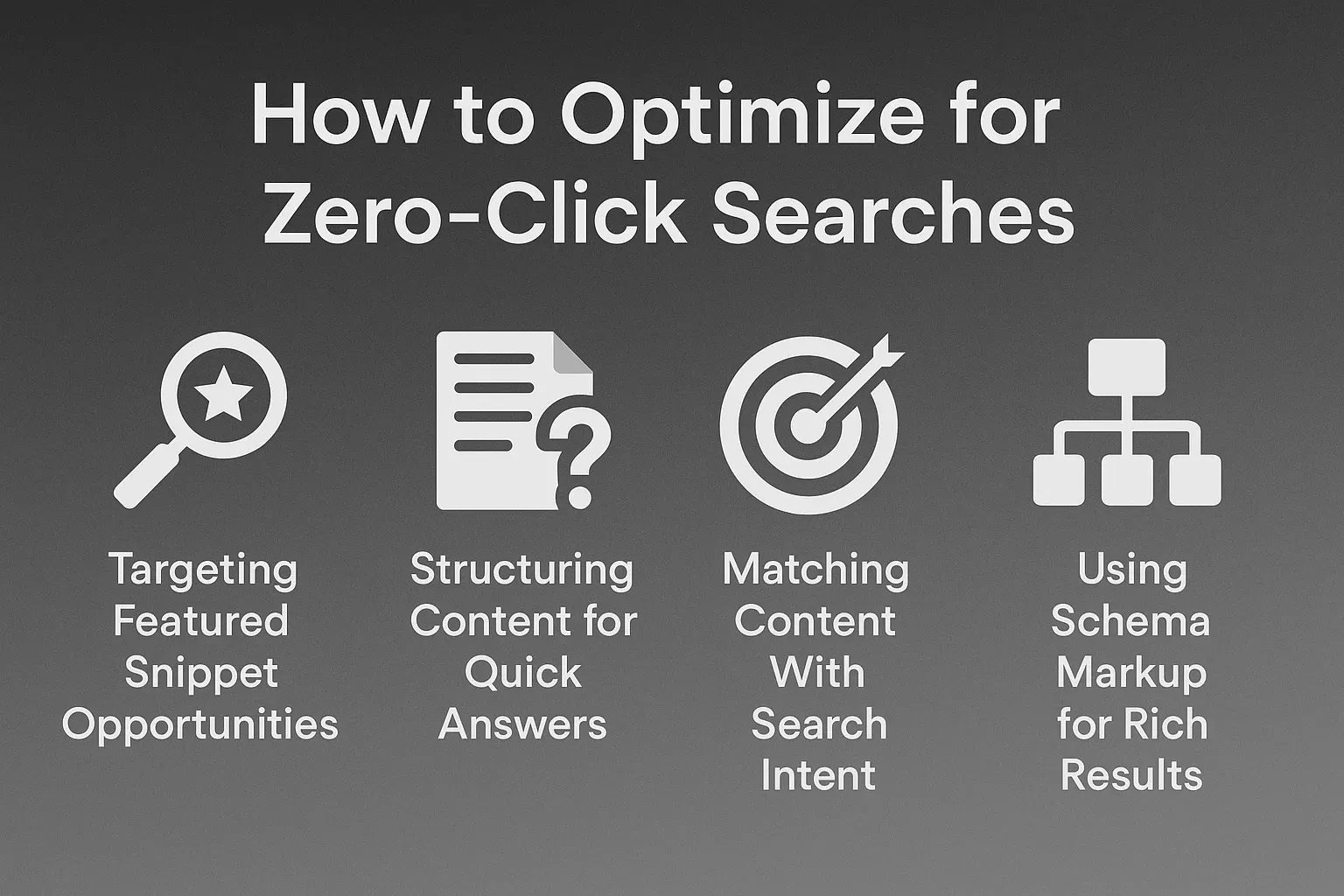
Targeting Featured Snippet Opportunities
Create content that answers questions in one short paragraph. Featured snippets pull information that is clear, structured, and easy for Google to understand. When you include definitions, short steps, or simple explanations, your content has a higher chance of being selected for a snippet. Add supporting details below the main answer to improve usefulness.
Structuring Content for Quick Answers
Google prefers content with clean formatting. When you use short paragraphs, bullet points, tables, and strong headings, your information becomes easier for Google to scan. This structure helps your page appear in snippets and answer boxes. Keep every answer focused on one topic to make your content clear.
Matching Content With Search Intent
Every search has a purpose. Some users want facts, others want steps, and some want comparisons. When your content matches that intent, Google sees it as a strong candidate for zero-click placement. Start each section with the exact answer users want before adding deeper details. This helps both readers and search engines.
Using Schema Markup for Rich Results
Structured data helps Google understand the meaning behind your content. When you add schema for FAQs, how-to steps, or definitions, your information becomes more eligible for enhanced SERP features. This increases your chances of showing up in zero-click positions even if users do not click through to your website.
Strategies to Win Zero-Click Searches
Winning zero-click results is about clarity, structure, and giving helpful information fast. When your page provides direct answers with strong formatting and supportive markup, Google considers it authoritative and easy to display on the results page.
Optimize for Direct Answers in 40–60 Words
Google often pulls answers that fall within a short range. Aim for one clear paragraph of about 40 to 60 words that answers a specific question. This answer should appear near the top of your page. Short, focused responses increase your chances of being chosen for a snippet.
Use Clear Headings and Bullet Points
Strong headings help Google understand the structure of your page. Bullet points make steps, lists, and explanations easy to scan. These simple formatting choices help your content qualify for list snippets and quick-answer boxes. They also improve readability for users.
Tracking Zero-Click Performance
Tracking performance helps you understand how often your content appears in zero-click results, even when users do not visit your website. These insights show how visible your brand is on Google and help you improve future content strategies.
How to Measure Impressions With Google Search Console
- Google Search Console shows how often your content appears on SERPs even without clicks
- Impressions reveal visibility and help you see which pages gain attention
- Higher impressions with low clicks often signal that your content appears in zero-click features
- Reviewing impression trends helps you identify which pages need stronger optimization or richer snippets
Monitoring SERP Features You Rank For
- Many SEO tools show which SERP features your site appears in
- Tracking positions in featured snippets, PAA boxes, and knowledge results helps you plan improvements
- When you know which SERP elements you occupy, you can adjust your content to strengthen visibility
- Monitoring changes lets you react quickly if competitors take your position
Using SEO Tools to Check Featured Snippet Wins
- Tools like Ahrefs, Semrush, and Moz show your featured snippet ownership
- These tools also reveal which keywords trigger snippets you can target
- Tracking snippet wins helps you understand what content format works best
- This allows you to create similar answer-style sections across more pages
When Zero-Click Searches Can Still Help Your Business
Zero-click searches still create real value because users see your brand even if they do not visit your site. Strong visibility builds trust, increases recognition, and positions your brand as an expert in your field. When users later need help or want more details, they are more likely to choose the brand they already saw on Google.
Building Brand Recognition
- When your name appears in SERP features, users notice your brand
- Repeated impressions create familiarity even without clicks
- Strong recognition leads users to choose your business later when they need solutions
Establishing Topical Authority
- Zero-click visibility shows Google that your content answers important questions
- Appearing in snippets and knowledge results boosts your perceived expertise
- Over time, this strengthens ranking signals for related topics
Increasing Trust Without Requiring a Click
- Users trust answers that appear directly on Google
- If your content powers these answers, your credibility grows
- This trust helps users feel confident choosing your website or business later
Conclusion
Zero-click searches are becoming more common as Google continues to refine how it delivers information. Even when users do not click, your brand can still benefit if you appear inside these SERP features. By structuring content for quick answers, adding schema markup, using strong headings, and matching search intent, you increase your visibility across search results. When your content appears in featured snippets, knowledge panels, or People Also Ask boxes, you build trust, authority, and brand recognition.
Share this article