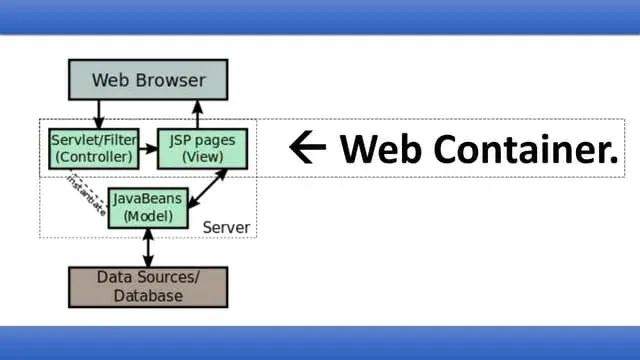
Web containers, also called servlet containers, play a vital role in how web applications function behind the scenes. They provide the environment where servlets, JavaServer Pages (JSP), and other Java-based web components run and interact with users. Without web containers, developers would need to manually manage processes like request handling, security, thread management, and application lifecycle.
The Role of Web Containers in Web Development
A web container does more than execute code. It creates a structured, scalable, and secure foundation for web applications. Instead of worrying about low-level mechanics, developers can focus on building logic and features.
- They manage servlets and JSP lifecycle automatically.
- Provide built-in security, authentication, and authorization.
- Handle multiple requests at the same time through thread management.
- Enable scalable architecture, supporting load balancing and clustering.
- Keep applications portable across servers.
Without a web container, every web request would require manual setup, slowing development and increasing the scope of errors.
Key Responsibilities of Web Containers
Web containers act as the backbone of Java-based web applications by managing several core processes.
Lifecycle Management
Web containers automatically:
- Create servlet instances
- Initialize them
- Process incoming requests
- Destroy servlets when no longer neededThis ensures efficient memory and resource usage.
Request Handling
When a browser sends an HTTP request:
- The container receives it
- Maps it to the correct servlet
- Passes data for processing
- Sends the response back to the user
This keeps communication smooth and fast.
Concurrency Control
Containers handle multiple requests simultaneously, without performance drops. This prevents conflicts and ensures users get quick responses even under load.
Security Management
Web containers can manage:
- Authentication
- User roles
- Data encryption
- This protects sensitive information and prevents unauthorized access.
How Web Containers Work
Web containers use multiple components to operate efficiently most of which developers never have to manually configure.
The Servlet Lifecycle
A servlet’s lifecycle has 4 main phases:
- Loading – The class is identified and loaded.
- Initialization – init() is called to prepare it.
- Request Processing – service() routes HTTP actions:
- doGet()
- doPost()
- etc.
- doGet()
- doPost()
- etc.
- Destruction – destroy() cleans up resources.
This entire process is container-managed.
Deployment Descriptor (web.xml)
The web.xml configuration file:
- Maps URLs to servlets
- Defines servlet initialization parameters
- Configures error pages
- Declares session timeout settings
- Controls filters and listeners
It acts as the blueprint of the application behavior.
Container-Managed Security
Containers enforce rules defined in the deployment descriptor:
- Client-certificate-based access
- Basic login
- Digest authentication
- Form-based login
Role definitions allow fine-grained access control to application modules.
Key Features of Web Containers
Scalability
Web containers support:
- Load balancing
- Horizontal scaling
- Session sharingWhich allows web applications to serve growing traffic.
Session Management
To keep users logged in or maintain cart data, containers manage session info through:
- Cookies
- URL rewriting
- HTTPS sessions
Resource Management
Web containers dynamically manage:
- Threads
- Database connections
- Memory allocationPreventing crashes and slowdowns.
JSP and Dynamic Content Support
JSP pages are automatically compiled into servlets. The container manages them just like servlets, a process completely hidden from the developer.
Popular Web Containers You Should Know
Here are the most widely used containers in modern Java development:
Apache Tomcat
- Most popular and open-source
- Lightweight
- Ideal for servlets & JSP apps
Jetty
- Highly configurable
- Used in embedded systems
- Fast and lightweight
GlassFish
- Full Java EE support
- Built-in web container
- Great for enterprise solutions
JBoss / WildFly
- Powerful application server
- Supports EJB, CDI, and more
- Best for large enterprise apps
How Web Containers Support Modern Development
Today’s development needs flexibility and efficiency. Web containers make it possible to:
- Deploy applications faster
- Maintain modular architecture
- Support microservices
- Integrate cloud-based environments
- Run containers inside Kubernetes & Docker
Instead of manually configuring servers, developers deploy, scale, and test applications rapidly especially in DevOps workflows.
Conclusion
Web containers are a fundamental pillar of Java web applications. They automate lifecycle management, security, request routing, and scalability, letting developers focus on building great features instead of server mechanics. Whether you’re deploying a small website or an enterprise-scale platform, choosing the right web container like Tomcat, Jetty, GlassFish, or JBoss ensures your application runs securely, efficiently, and at scale.
Read More About: What Is jQuery?
Share this article