Learning how to scale hosting helps you prepare your website for growing traffic and heavier user activity. As your audience grows, your hosting must handle more requests, more data, and more load without slowing down. When you understand how to scale hosting, you can keep your website fast, stable, and ready for any increase in visitors. This gives users a smooth experience and helps your site perform well as it grows.
What Does It Mean to Scale Hosting?
Scaling hosting means increasing your server’s ability to handle more traffic and larger workloads. It keeps your website fast even when visitors surge. As your site grows, scaling makes sure your hosting can support new demands instead of breaking under pressure. This helps your website stay stable, load quickly, and remain available at all times.
Simple Definition of Hosting Scalability
Hosting scalability describes how easily your server can increase resources when traffic grows. This may include adding more RAM, CPU power, storage, or full servers. A scalable setup adjusts to your needs without changing the entire system. When your hosting scales smoothly, your website stays fast and stable even when activity rises.
Vertical vs Horizontal Scaling Explained
Vertical scaling means upgrading the power of one server. You increase RAM, CPU, or storage to handle more traffic. It is simple, but it has limits because one server can only grow so much.
Horizontal scaling means adding more servers to share the load. Instead of one machine doing all the work, several servers work together. This gives more flexibility and helps you handle large spikes in traffic. Many growing websites use horizontal scaling because it supports long term growth.
Signs Your Website Needs to Scale Hosting
You know it is time to scale hosting when your website slows down or struggles during busy hours. Frequent timeouts, slow load speeds, and increased bounce rates also show your resources are close to their limit. If your analytics show rising traffic or if your site grows with new features, this is a clear sign you need stronger hosting. When your server cannot handle normal requests smoothly, scaling becomes necessary to protect performance.
Why Scaling Hosting Matters for Growing Websites
Scaling hosting matters because your website must stay fast, stable, and available as traffic grows. When more people visit your site, your server needs enough resources to handle every request. If your hosting cannot keep up, your website slows down or goes offline, which affects users and your long-term performance. Scaling at the right time helps you stay ahead of problems and supports steady growth.
Preventing Downtime During Traffic Surges
Traffic surges can overload small servers. When too many users visit at the same time, your site may stop responding. Scaling hosting prevents this by adding more resources or servers when needed. This keeps your website online during busy hours, product launches, holiday sales, or viral moments. Strong hosting ensures every visitor can access your site without interruptions.
Keeping Load Speed Fast Under Heavy Traffic
Fast load speed matters for every website. As traffic grows, your server must work harder to deliver each page. If your hosting is not scalable, your site slows down and users leave. Scaling hosting keeps load speed consistent because the server has enough power to handle more requests. This helps every user enjoy a smooth experience, even when your site becomes busy.
Supporting User Experience and SEO Performance
Search engines prefer websites that load fast and stay reliable. When your hosting scales properly, your pages stay quick and stable. This improves user experience, which helps your SEO performance. Visitors stay longer, bounce less, and interact more because the website works cleanly. Scaling hosting protects these signals and helps your rankings stay strong as your audience grows.
Types of Hosting That Allow Easy Scaling
Different hosting types offer different levels of scalability. Some make scaling simple, while others limit how far you can grow. When you know these differences, you can choose hosting that supports long-term traffic growth.
Shared Hosting (Limited Scalability)
Shared hosting places many websites on one server. It is affordable but not designed for growing traffic. When your site becomes busy, shared hosting cannot scale enough to support new demands. This setup works for small sites but becomes a problem once traffic increases.
VPS Hosting (Flexible Resource Upgrades)
VPS hosting gives you dedicated resources inside a shared environment. You can upgrade RAM, CPU, and storage easily when traffic grows. This flexibility makes VPS hosting a good choice for websites that need more power but are not ready for a full server.
Cloud Hosting (Best for Auto-Scaling)
Cloud hosting offers the most scalable environment. Your website runs on multiple servers instead of one machine. This allows auto-scaling, which adds resources instantly when traffic rises. Cloud hosting handles spikes smoothly and supports long-term growth without downtime. It is the best option for websites with unpredictable or fast-growing traffic.
Dedicated Hosting (Powerful but Less Flexible)
Dedicated hosting gives you a full physical server. It offers strong performance, but scaling is limited because you can only upgrade the hardware to a certain point. If your site outgrows the server, you need a new machine or a cloud setup. Dedicated hosting works for large websites that need stable power but do not need rapid scaling.
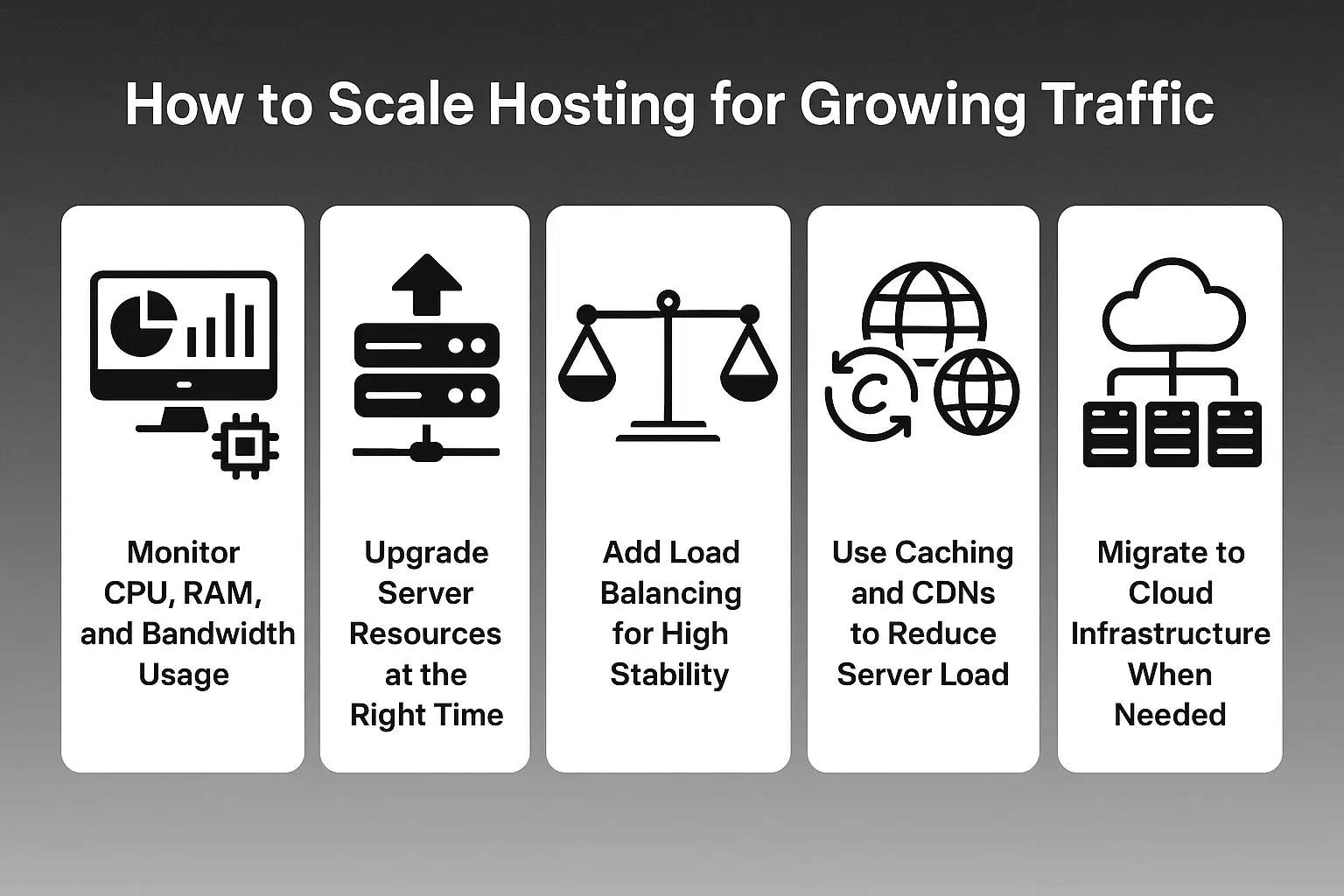
How to Scale Hosting for Growing Traffic
Scaling hosting requires close attention to how your server handles resource usage. When you track performance and upgrade at the right time, your website stays fast even as traffic increases. Each method below helps you prepare for steady growth without risking slowdowns or downtime.
Monitor CPU, RAM, and Bandwidth Usage
Your server performance depends on how much power it has. CPU, RAM, and bandwidth show how well your hosting supports your website. When these numbers reach their limits, your site slows down. Regular monitoring helps you understand when you need more resources so your website stays fast during growth.
Upgrade Server Resources at the Right Time
Once your usage stays high for long periods, it is time to upgrade. Adding more RAM, CPU power, or storage gives your server the strength to handle more traffic. Upgrading at the right time prevents crashes and protects your user experience. Steady planning keeps your growth smooth.
Add Load Balancing for High Stability
Load balancing spreads traffic across several servers. Instead of one server handling everything, each request goes to the machine with more room. This increases stability and prevents overload during busy moments. Load balancing is important for websites with unpredictable or high traffic.
Use Caching and CDNs to Reduce Server Load
Caching stores popular content so users can access it faster. CDNs place your files on different global servers, which reduces pressure on your main server. Many businesses use hosting setups like these because they improve speed and protect performance. When your website loads fast from anywhere, your hosting works more efficiently.
Migrate to Cloud Infrastructure When Needed
If your traffic grows quickly, cloud hosting becomes necessary. It scales easily and adjusts to sudden traffic changes. Cloud systems add more power without stopping your website, which makes them ideal for long-term growth. This supports your scaling plan by reducing load and improving efficiency.
Technical Strategies to Handle Traffic Growth
Technical upgrades help your website handle bigger audiences without slowing down. These strategies support stability, speed, and long-term performance.
Auto-Scaling for Sudden Traffic Spikes
Auto-scaling increases resources automatically when traffic rises. This prevents slowdowns and downtime during sudden spikes. It is one of the strongest tools for websites that experience unpredictable growth.
Using Multiple Data Centers for Faster Delivery
When your content comes from more than one data center, users get quicker responses. This lowers latency and supports fast delivery in different regions. Your website stays stable even when one location gets busy.
Optimizing Databases and Server Configuration
Databases can slow down when they grow. Cleaning queries, indexing tables, and optimizing configuration improves response time. A clean database helps your website stay fast even with heavy activity.
Containerization (Docker / Kubernetes) for Scaling Apps
Containers help you run applications in a flexible way. They make scaling simple because you can add more containers instead of rebuilding your system. Kubernetes automates the scaling process and ensures stable performance.
Cost Factors When You Scale Hosting
Scaling hosting affects your budget, so it helps to understand how different options change your costs.
Pay-As-You-Go Cloud Pricing
Cloud hosting charges you for what you use. When traffic grows, your cost increases. When traffic drops, you pay less. This model gives you flexibility and helps manage unpredictable growth.
Scaling Up vs Scaling Out Costs
Scaling up means upgrading one server. It is cheaper in the beginning but has limits. Scaling out adds more servers, which costs more but supports higher traffic. Both methods serve different stages of growth.
Hidden Costs to Watch (Storage, Bandwidth, Backups)
Extra features can increase your bill. Storage, bandwidth, and backups may add hidden costs. Monitoring these helps you stay within your planned budget while scaling smoothly.
How to Choose the Right Hosting Provider for Scaling
Choosing the right hosting provider makes scaling easier and safer. A strong provider supports growth without limiting your performance.
What to Look for in Scalable Hosting Plans
Look for plans that offer flexible upgrades, high uptime, and smooth resource changes. A scalable plan should help you grow without moving your entire setup.
Importance of 24/7 Support During High Traffic
Traffic issues can happen anytime. Good support helps you solve problems fast. When your provider responds quickly, your website stays stable during busy moments.
Why Cloud-Based Providers Are More Future-Proof
Cloud hosting prepares your website for long-term growth. It gives you instant access to resources and supports auto-scaling. Many websites choose cloud hosting because it works for both small and large growth stages.
Conclusion
When you monitor performance and upgrade resources at the right time, you prevent downtime and protect user experience. Strong hosting also supports better rankings because search engines reward fast and reliable websites. As your audience increases, a solid scaling plan ensures your site remains smooth, secure, and ready for long term growth. When you choose the right tools and hosting environment, your website can handle any level of traffic without losing speed or stability.
Share this article