Many people confuse UX (User Experience) and UI (User Interface), but understanding UX and UI differences is essential for creating a website that attracts, engages, and converts visitors. UX design focuses on how users interact and feel while navigating your website, whereas UI design defines how your site looks and responds visually. Together, they form the backbone of effective digital experiences that not only look beautiful but also drive measurable business results.
What Is UX Design?
User Experience (UX) design focuses on how people interact with your website and how easily they can achieve their goals. It’s about creating a smooth, meaningful, and enjoyable journey that guides users toward the action you want them to take.
Core Purpose and Principles of User Experience
The main goal of UX design is to make digital experiences simple and useful. A well-structured UX removes confusion and improves engagement. Key principles include:
- User-focused structure: Start with understanding who your users are, their goals, and their pain points.
- Clarity and flow: Every page should help users find what they need quickly and naturally.
- Consistency: Keeping layout, tone, and navigation uniform across all pages.
- Accessibility: Making your website usable for everyone, including those with disabilities.
- Testing and improvement: Collecting feedback and optimizing continuously.
By following these principles, businesses can create websites that not only attract attention but also keep visitors engaged long enough to take action.
Typical Responsibilities and Deliverables of UX Designer
UX designers work on the strategy and structure of a website rather than just the visuals. Their work includes:
- Creating wireframes that outline the layout.
- Building prototypes to test user flows before development.
- Mapping user journeys to identify touchpoints and potential barriers.
- Conducting usability tests to find and fix issues early.
A professional approach to UX ensures every element on your website serves a clear purpose. At 1REALTOUR’s web design agency in San Diego, UX planning happens before design begins. This ensures every page aligns with both user needs and business goals, improving conversions and retention rates.
What Is UI Design
User Interface (UI) design focuses on how your website looks and feels. It’s the visual layer that users interact with — from buttons and colors to typography and layout. While UX focuses on “how it works”, UI focuses on “how it looks and communicates”. A good UI design builds trust, captures attention, and makes navigation effortless.
Visual Focus and Role in UI
UI design brings personality to your website. It helps communicate your brand message visually while keeping usability front and center. Key aspects of UI design include:
- Color palette: Using consistent, brand-aligned colors that evoke emotion.
- Typography: Clear and readable fonts that enhance hierarchy and flow.
- Visual hierarchy: Ensuring the most important elements stand out first.
- Interactive elements: Buttons, menus, and icons that guide users intuitively.
- Spacing and alignment: Maintaining balance and breathing room to avoid clutter.
A modern UI design doesn’t just make a site beautiful, it helps guide users’ attention and improves overall engagement.
Responsibilities and Key Components of UI Designer
UI designers translate ideas and wireframes into high-quality, interactive designs. Their main responsibilities include:
- Designing responsive layouts that look great on all devices.
- Creating design systems and reusable visual components.
- Building prototypes that mirror the final product.
- Collaborating with UX designers to ensure function and form align.
Effective UI design builds an instant connection with users. It gives your brand a professional, trustworthy appearance while making navigation seamless.
If your business website needs a modern visual refresh, explore our web design services to see how a clear, consistent interface can improve conversions and user engagement.
UX vs UI: Side-by-Side Comparison
Although UX and UI design are closely connected, they play different roles in how users experience your website. UX defines the structure and flow, while UI defines the look and feel. When these two elements work together, they create a seamless experience that builds trust and drives conversions.
Here’s a simple comparison that highlights their differences and how they complement each other:
Aspect | UX Design | UI Design |
Focus | User interaction, usability, and satisfaction | Visual appearance and interactive design |
Goal | Make the experience simple and intuitive | Make the experience visually appealing |
Key Deliverables | Wireframes, user flows, and prototypes | High-fidelity mockups, icons, and typography |
Tools Used | Figma, Adobe XD (for wireframes and testing) | Figma, Sketch (for interface visuals) |
Involvement Stage | Early stage of product or site planning | Later stage after UX structure is defined |
Measurement | Based on usability testing and user behavior | Based on aesthetic consistency and engagement |
When businesses confuse the two, they often end up with a website that looks attractive but performs poorly. A well-balanced approach uses UX to guide functionality and UI to refine the presentation.
How UX and UI Work Together
UX and UI design are not separate processes; they complement each other. A website with an appealing interface but poor usability will struggle to retain users. Similarly, a website that functions well but lacks visual appeal may fail to attract them in the first place.
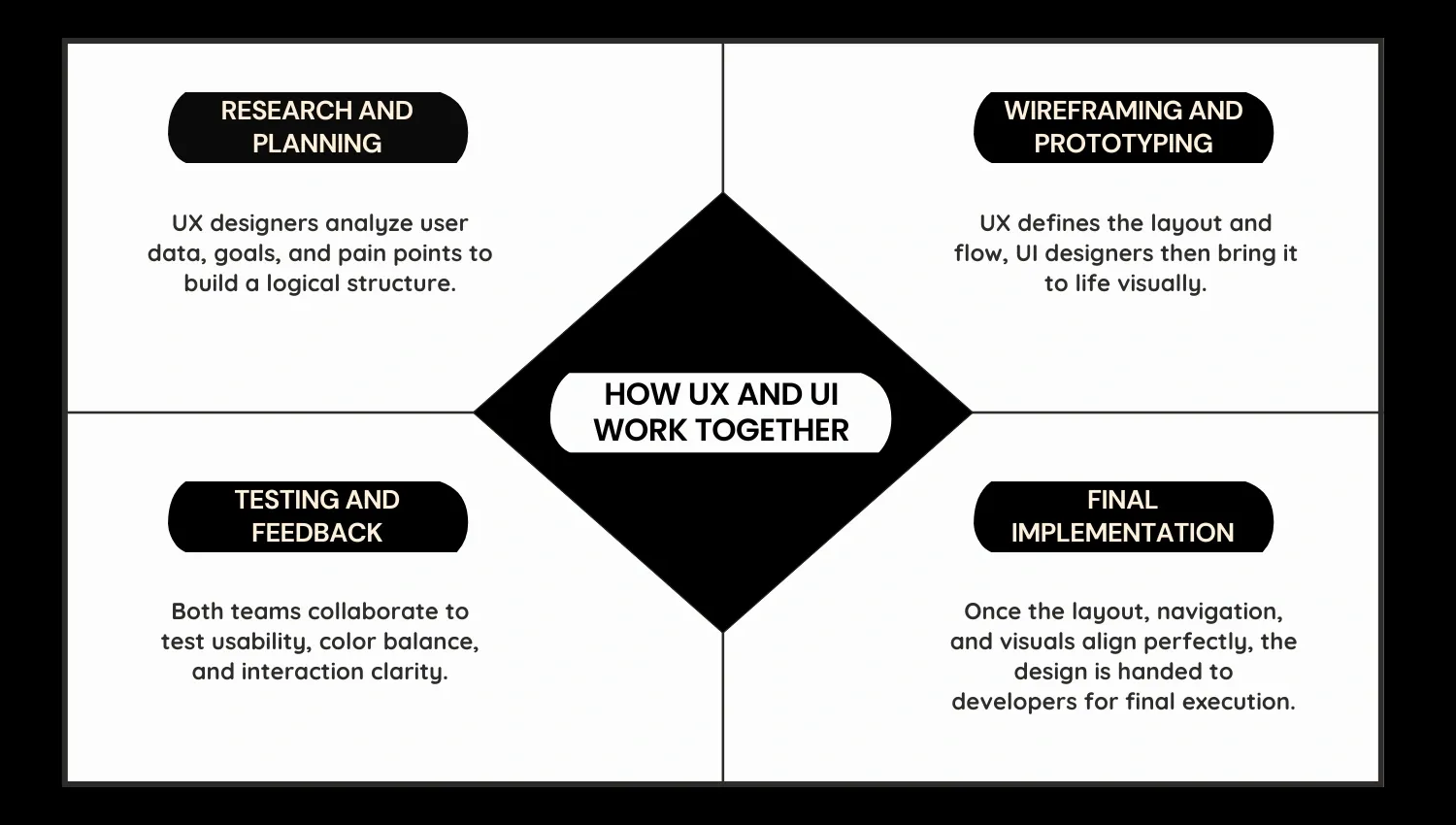
The UX and UI Collaboration Process
- Research and Planning: UX designers analyze user data, goals, and pain points to build a logical structure.
- Wireframing and Prototyping: UX defines the layout and flow, UI designers then bring it to life visually.
- Testing and Feedback: Both teams collaborate to test usability, color balance, and interaction clarity.
- Final Implementation: Once the layout, navigation, and visuals align perfectly, the design is handed to developers for final execution.
When done right, the combination of UX and UI helps improve engagement rates, lower bounce rates, and drive measurable conversions.
For brands looking to elevate their online presence, our San Diego Web Design for Real Estate Agents service is a great example of how strategic UX and UI together create real business growth.
Why Knowing the UX and UI Difference Matters
Understanding the difference between UX and UI design is not just about terminology, it’s about creating a strategy that directly impacts how your users think, feel, and act on your website. When businesses clearly define these roles, they build experiences that attract visitors, keep them engaged, and inspire them to convert.
Impact on User Satisfaction, SEO, and Conversions
A strong UX foundation ensures users find what they need quickly and effortlessly, while effective UI design keeps them visually engaged throughout the journey. Together, they influence key website performance areas such as:
- User Satisfaction: A smooth navigation experience reduces frustration and builds trust.
- SEO Performance: Search engines reward well-structured, user-friendly websites. Google itself highlights that page experience is a key ranking factor.
- Conversion Rates: A seamless experience combined with visually appealing design helps turn visitors into paying customers.
For more insights on how design impacts engagement, Adobe’s study on UX and brand perception reveals that 38% of users stop engaging with unattractive websites. This shows how crucial both UX and UI are in shaping visitor behaviour and long-term loyalty.
Common Mistakes of UX and UI & How to Avoid Them
Even experienced design teams can make errors when blending UX and UI principles. Recognizing these issues early can save time, prevent frustration, and ensure consistent brand performance.
Common Mistakes
- Jumping to UI before UX: Creating visuals without understanding user behavior often leads to poor usability.
- Ignoring Data and Testing: Skipping research means missing what users actually want or need.
- Inconsistent Visuals: Mixing fonts, colors, and button styles disrupts user trust.
- Complex Layouts: Overloading a page with elements makes navigation difficult.
Tips to Avoid These Mistakes
- Start with UX research and gather real user insights before designing.
- Create wireframes and prototypes to visualize user flows before adding visuals.
- Keep branding consistent to strengthen recognition.
- Continuously test and optimize user paths to identify friction points and fix them quickly.
A thoughtful combination of UX and UI turns your website into a seamless digital experience that delivers measurable results.
Conclusion
Understanding the difference between UX and UI design is essential for building a website that truly connects with users. While UX ensures a smooth and intuitive experience, UI brings that experience to life visually, creating a design that looks great and performs even better. When both work together, the result is a digital experience that inspires trust, boosts engagement, and drives conversions.
Ready to elevate your website with strategic UX and stunning UI design? Contact the 1REALTOUR team today to start your transformation.
Share this article