Learning how to reduce website latency helps you keep your site fast, smooth, and easy to use. Latency affects every part of website performance, from how quickly a page responds to how long a visitor stays. When latency is high, your pages feel slow and your users leave before the site loads. When latency stays low, your website feels sharp and your visitors remain engaged. Understanding the cause of latency helps you fix problems early and build a website that performs well for every user.
Understanding What Website Latency Means
Website latency describes the time it takes for a user’s request to reach your server and return with a response. It shows how quickly your site reacts when someone clicks a link or opens a page. When latency stays low, your website responds instantly. When latency grows, everything feels slow even if your design and content are strong.
Simple Definition of Latency
Latency is the delay between a user action and the server response. It measures how long it takes for data to travel across the network. High latency means slow reactions. Low latency means fast responses. Reducing latency keeps your website quick and smooth.
How Latency Affects Website Speed
Latency affects how fast your website loads because each request adds time. Even a small delay increases the total load time, which impacts how users feel about the page. When latency rises, images take longer to appear, scripts run slowly, and pages stall. When latency drops, your site loads quickly and responds immediately.
Why Reducing Latency Matters for SEO and UX
Search engines reward websites that load fast and respond quickly. High latency hurts your speed scores and affects your rankings. It also creates a poor user experience because visitors do not enjoy waiting. When you reduce website latency, you improve both SEO and user satisfaction. This leads to longer visits, higher engagement, and stronger performance overall.
Common Causes of High Website Latency
Website latency increases when your server or front-end setup slows down the flow of data. Many issues build up over time and make your site feel slow even when the design looks clean. Understanding the root causes helps you identify what needs improvement so your website stays fast and stable.
Long Physical Distance Between User and Server
The farther a user is from your server, the longer it takes for requests to travel. Data must move across networks and regions, which increases delay. When users are spread across different countries, latency rises quickly. Choosing the right server location makes a clear difference in how fast your website responds.
Slow DNS Resolution
DNS acts like the phonebook of the internet. When DNS resolution is slow, the browser spends more time finding your server. This delay adds to your page load time. A high-quality DNS provider helps you reduce website latency by resolving your domain faster.
Heavy Images and Large Files
Large files slow pages because they take longer to load. Heavy images, uncompressed graphics, and large multimedia files push more data through the network. This increases latency and hurts user experience. Smaller, optimized files keep your website quick and responsive.
Unoptimized Code and Scripts
Too many scripts or poorly written code increases load delays. Large CSS files, heavy JavaScript, and messy HTML add extra work for the browser. When code is unoptimized, your website feels slow even if the server is strong. Clean code helps reduce website latency and boosts performance.
Server Overload or Weak Hosting Resources
If your hosting plan lacks enough CPU, RAM, or bandwidth, your site struggles during busy hours. Overloaded servers respond slowly because too many requests hit the system at once. Upgrading your hosting or choosing a stronger setup helps control latency and keeps your site steady.
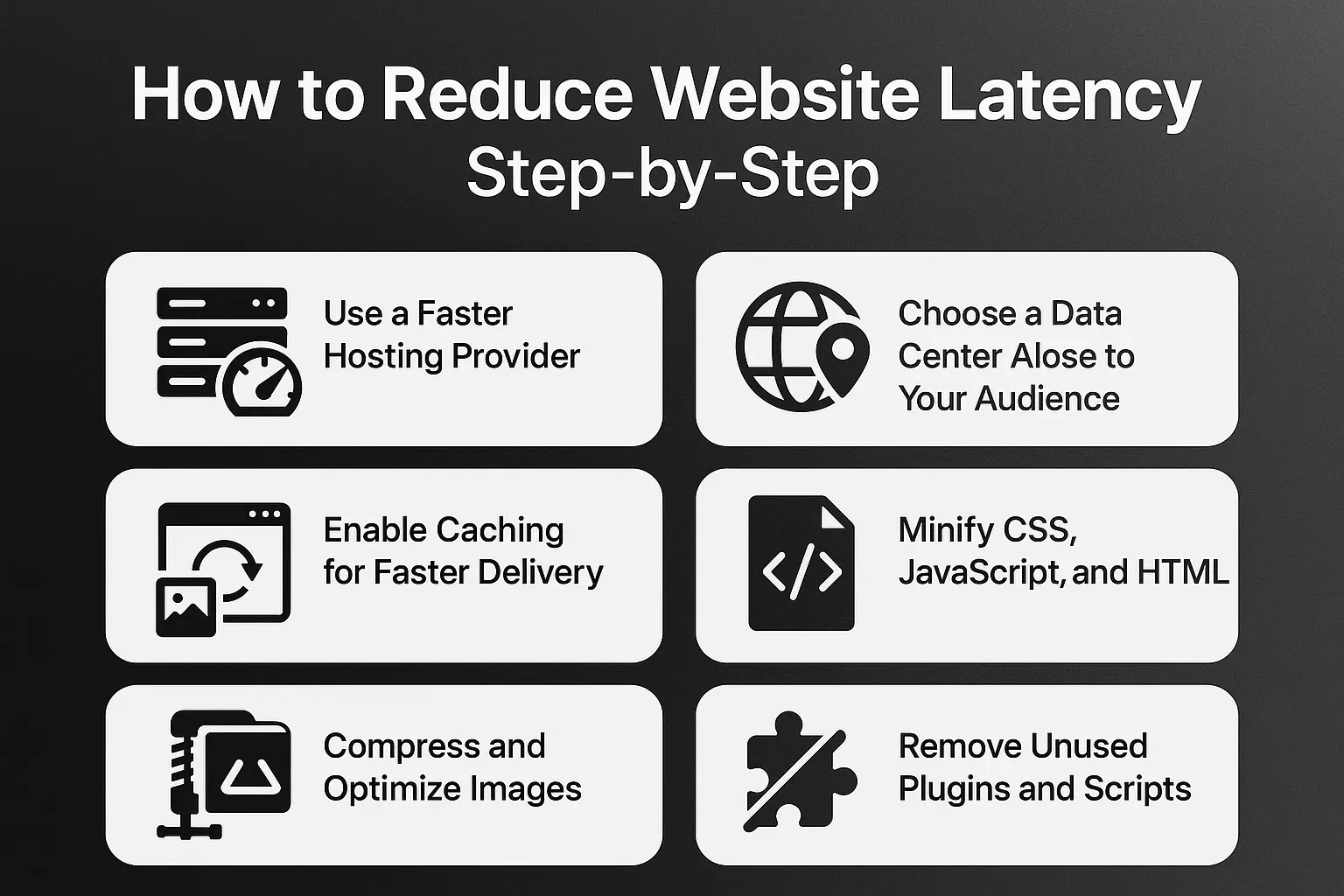
How to Reduce Website Latency Step-by-Step
Reducing latency requires steady improvements across hosting, content, and code. Each small step helps your website respond faster and support more users without slowing down.
Use a Faster Hosting Provider
Your hosting provider plays the biggest role in website speed. A fast server responds quickly and handles more traffic without delay. Choosing a high-performance host gives your website the power it needs to stay responsive.
Choose a Data Center Close to Your Audience
Selecting a data center near your main audience reduces the distance data must travel. This cuts down on latency and makes your website feel faster for users in that region. If your visitors are spread worldwide, you may need a global hosting setup.
Enable Caching for Faster Delivery
Caching stores ready-to-use versions of your content. Instead of loading everything from scratch, the server delivers cached files instantly. This reduces server workload and makes your pages load much faster. Caching is one of the easiest ways to reduce website latency.
Compress and Optimize Images
Small, optimized images load quickly and improve page performance. Proper compression reduces file size without hurting quality. This helps your site load faster and lowers the delay between user requests and server responses.
Minify CSS, JavaScript, and HTML
Minification removes extra characters, spacing, and unnecessary code. This makes your files lighter and faster to load. Clean code helps reduce website latency because the browser processes everything with less effort.
Remove Unused Plugins and Scripts
Unused plugins, scripts, and tracking tools add weight to every page. They slow down your website even if you do not use them. Removing unnecessary items makes your site lighter, faster, and easier to manage.
Using a CDN to Reduce Latency Globally
A Content Delivery Network, or CDN, helps your website deliver content faster to users across the world. It reduces the distance between your server and the visitor by storing copies of your files in many global locations. This setup is one of the strongest ways to reduce website latency for international traffic.
How CDNs Route Content Through Edge Servers
CDNs use edge servers placed in different regions. When a visitor loads your website, the request goes to the closest edge server instead of your main server. This short path reduces delay and speeds up the response. Edge servers keep your pages, images, and scripts ready for quick delivery.
Benefits of CDNs for Large and Global Websites
A CDN helps your website stay fast even when visitors come from different countries. It lowers load times, reduces pressure on your main server, and supports heavy traffic. Large websites rely on CDNs to handle peak hours without slowing down. Small websites also benefit because global delivery becomes much smoother.
How CDNs Reduce Round-Trip Time
Round-trip time measures how long it takes for a request to reach your server and return. CDNs cut this time by moving content closer to users. Shorter distance means faster delivery, fewer delays, and better performance. This improvement helps reduce website latency across all devices.
DNS Optimization Techniques
DNS plays a key role in how quickly your website loads. When DNS is slow, the browser takes longer to find your server. Optimizing DNS gives your website a stronger foundation and reduces the time before loading begins.
Using a High-Performance DNS Provider
A fast DNS provider improves the speed of domain lookups. Strong providers spread their servers worldwide to reduce delays. When DNS responds quickly, your website begins loading sooner and users see pages faster. This simple upgrade helps reduce website latency right from the start.
Reducing DNS Lookups
Each lookup adds time to the loading process. Many websites load files from multiple domains, which increases the number of lookups. Reducing extra domains lowers delays and makes your pages load faster. Keep your resources on fewer domains to keep latency low.
DNS Caching for Faster Resolution
Browsers and servers store DNS results for a short time. This is called DNS caching. When caching works well, repeated visits load much faster because the browser does not look up the domain again. A proper caching setup gives users quicker access and reduces overall latency.
Server-Level Improvements That Lower Latency
Your server has a big impact on how fast your website responds. When the server is slow or overloaded, every request takes longer. Improving the server setup helps reduce website latency and gives your visitors a smoother experience.
Upgrading CPU, RAM, and Storage
Stronger hardware allows your server to process requests faster. A powerful CPU handles more tasks at the same time. Extra RAM supports more sessions during busy hours. Fast SSD storage loads files quickly and reduces delays. These upgrades make your server more responsive and reduce overall latency.
Using HTTP/2 or HTTP/3
Modern protocols like HTTP/2 and HTTP/3 allow faster transfers between the browser and your server. They improve how files load and support multiple requests at once. These protocols reduce website latency by cutting wait time and improving connection speed.
Enabling Keep-Alive Connections
Keep-Alive keeps the connection open between the browser and server. This means new requests reuse the same link instead of starting fresh each time. This reduces the number of round trips and makes your pages load faster.
Database Optimization Techniques
A slow database increases latency because it takes longer to find the data your site needs. Cleaning old entries, indexing tables, and optimizing queries keeps database requests light. A tuned database responds faster and helps reduce website latency during heavy traffic.
Front-End Optimization That Reduces Latency
Front-end issues slow websites even when the server is strong. Cleaning your front-end helps pages load faster and improves user experience across devices.
Lazy Loading Images and Videos
Lazy loading delays images and videos until the user scrolls near them. This reduces the amount of data loaded at the start. Your page becomes lighter, and latency drops because fewer files load at once.
Preloading Key Resources
Preloading tells the browser which files to load first. Fonts, main scripts, or hero images become available sooner. This reduces delays because the browser prepares important elements before users see the page.
Using Browser Caching Properly
Browser caching saves files so returning visitors load your site faster. When caching works well, your server handles fewer requests. This reduces website latency and improves overall speed.
Reducing Third-Party Scripts
Too many external scripts slow down your pages. Ads, widgets, and trackers can increase delays. Removing unneeded scripts keeps your site light and reduces the time it takes to load each page.
Monitoring Tools to Measure Latency
Measuring latency helps you understand how your site performs across different regions and devices. Tracking your data makes it easier to see what needs improvement.
Using WebPageTest, GTmetrix, and PageSpeed Insights
These tools show how fast your site loads and where delays appear. They highlight slow scripts, heavy images, and server issues. With clear data, you can reduce website latency by fixing the right problems first.
Understanding TTFB, RTT, and LCP Metrics
TTFB measures how long your server takes to respond.RTT shows the delay between the browser and server.LCP tracks how fast the main part of your page appears.
These metrics help you understand where latency comes from and how to improve it.
Tracking Latency Across Different Locations
Latency changes based on where your users live. Testing from different regions helps you see delays that local tests miss. When you understand global performance, you can make better hosting and CDN decisions to reduce website latency worldwide.
Conclusion
Learning how to reduce website latency helps you keep your site fast, stable, and ready for growing traffic. When you optimize hosting, upgrade your server, clean your front-end, and use a CDN, every part of your website responds faster. These improvements help your visitors enjoy smoother interactions and help search engines understand your site better. Reducing latency takes steady work, but the results create a stronger and more reliable online experience for every user.
Share this article