What are Hooks in WordPress? Types of Hooks
Learning about hooks in WordPress helps you understand how the platform adds features and changes output without editing core files. Hooks give you safe control over how WordPress behaves, which makes them one of the most important tools for customizing themes and plugins. When you know how hooks work, you can change small parts of your site or build new features with clean and stable code. This makes your website easier to manage and easier to grow.
Understanding What Hooks Are in WordPress
Hooks in WordPress allow you to add, change, or remove functions at specific points in the system. They give developers a simple way to connect custom code to WordPress without touching the core. This makes your website more flexible and keeps your changes safe during updates.
Simple Definition of Hooks
Hooks are connection points inside WordPress where you can attach your own code. They tell WordPress, “Run this function here.” Hooks control many actions behind the scenes, from loading scripts to adjusting content on a page. They help you extend features without breaking anything.
How Hooks Work Inside WordPress
WordPress runs through a long sequence of events while loading a page. At specific moments, it checks if any functions are attached to a hook. If it finds them, it runs them in order. This process allows you to add new steps, replace content, or modify behavior without changing the original files. Hooks act like signals that tell WordPress when your custom code should run.
Why Hooks Matter for Customization
Hooks matter because they keep customizations safe and maintain clean code. You can change layout, modify content, or add features without editing core files or installed plugins. This helps your site stay stable during updates. Hooks give you full control while keeping your WordPress setup organized and easy to maintain.
The Two Main Types of WordPress Hooks
Hooks in WordPress fall into two clear groups. Each group controls a different part of how WordPress runs. When you understand both types, you can decide where your custom code fits and how to change the behavior of themes or plugins safely.
What Action Hooks Do
Action hooks let you add new tasks at specific moments. They run your custom functions when something happens inside WordPress. You can load scripts, add HTML, send emails, or trigger any feature you want. Action hooks help you extend WordPress with new behavior that did not exist before.
What Filter Hooks Do
Filter hooks let you change existing content before WordPress displays it. They adjust text, titles, URLs, forms, or anything else that passes through the system. Filters do not run tasks. Instead, they modify data and return the updated result so WordPress can display it.
Key Differences Between Action and Filter Hooks
Action hooks run custom features. Filter hooks modify existing content. Actions produce something new, while filters change something already there. Actions do not return values, but filters must return the updated value. When you understand this difference, choosing the right hook becomes simple.
How Action Hooks Work
Action hooks run your code at a specific moment during WordPress execution. They help you add features without touching core files. This keeps your site clean and makes updates safe.
When to Use Action Hooks
Use action hooks when you need to run tasks. This includes loading scripts, inserting HTML, sending notifications, or creating new output. Action hooks work best when you want to add something new to a page or trigger an event.
Common Examples of Action Hooks
WordPress includes many built-in action hooks. Here are a few you will see often:
- wp_head – Adds code inside the head section
- wp_footer – Adds code at the end of the page
- init – Runs early to register features
- admin_menu – Adds items to the admin menu
These hooks fire at clear stages, giving you predictable places to attach your functions.
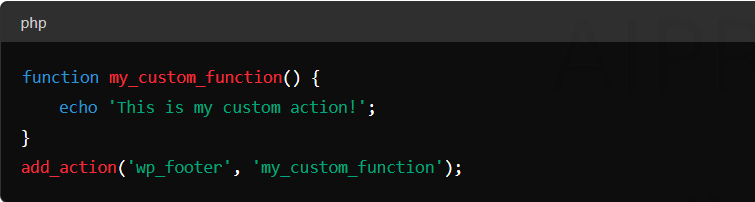
Simple Code Example for Action Hooks
Here is a simple action hook example that prints a message in the footer:
How Filter Hooks Work
Filter hooks change data that already exists. They adjust what WordPress sends to the browser and give you full control over the final output.
When to Use Filter Hooks
Use filter hooks when you want to modify titles, content, buttons, email messages, or anything else WordPress processes. Filters work best when you need to tweak data without changing any structure.
Common Examples of Filter Hooks
Here are some filters you will use often:
- the_title – Changes post titles
- the_content – Changes post content
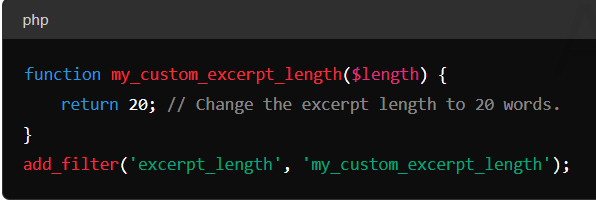
- excerpt_length – Adjusts excerpt size
- upload_mimes – Controls allowed file types
These filters help you modify WordPress output in clean and simple ways.
Simple Code Example for Filter Hooks
Below is a filter hook example that changes the post title:
Practical Uses of Hooks in Real WordPress Sites
Hooks in WordPress make it easy to change how your website works without touching core files. They give you control over layout, content, and features in a safe way. When you use hooks correctly, you can customize your site with clean code that stays stable through updates.
Adding New Features Without Editing Core Files
Hooks help you add new features without changing any WordPress core files. You can load scripts, add banners, create forms, or run custom tasks at specific points. This approach keeps your website safe because your changes do not disappear when WordPress updates.
Modifying Content Output
You can use hooks to change the way content appears on your site. Filters help you adjust text, titles, buttons, and other elements before WordPress displays them. This makes content changes simple and keeps your layout flexible.
Customizing Themes and Plugins Safely
Themes and plugins often include their own hooks. These hooks let you change output or add new elements without editing the theme or plugin directly. This protects your website during updates and keeps your custom code separate from core files.
How to Create Your Own WordPress Hooks
WordPress lets you create your own hooks when you need more control. Custom hooks help you build flexible themes, plugins, and features. They give other developers or team members a way to extend your code safely.
Creating Custom Action Hooks
You can create a custom action hook using the do_action() function. This hook allows other functions to run at a specific point. Here is a simple example:
do_action('my_custom_action');
Other developers can attach functions to this hook to run tasks at that moment.
Creating Custom Filter Hooks
You can create a custom filter hook using apply_filters(). This hook passes data through a filter so it can be changed. Here is an example:
$value = apply_filters('my_custom_filter', $value);
This lets other functions adjust the data before it returns.
When Custom Hooks Make Sense
Custom hooks make sense when you build plugins, themes, or large features that other people may extend. They also help when you want clean and modular code that can grow without editing old files. Custom hooks keep your structure simple and easy to manage.
How to Create Your Own WordPress Hooks
WordPress lets you create your own hooks when you need more control. Custom hooks help you build flexible themes, plugins, and features. They give other developers or team members a way to extend your code safely.
Creating Custom Action Hooks
You can create a custom action hook using the do_action() function. This hook allows other functions to run at a specific point. Here is a simple example:
do_action(‘my_custom_action’);
Other developers can attach functions to this hook to run tasks at that moment.
Creating Custom Filter Hooks
You can create a custom filter hook using apply_filters(). This hook passes data through a filter so it can be changed. Here is an example:
$value = apply_filters(‘my_custom_filter’, $value);
This lets other functions adjust the data before it returns.
When Custom Hooks Make Sense
Custom hooks make sense when you build plugins, themes, or large features that other people may extend. They also help when you want clean and modular code that can grow without editing old files. Custom hooks keep your structure simple and easy to manage.
Best Practices When Using Hooks
Using hooks the right way keeps your website stable and your code clean. These practices help you avoid common problems and maintain a healthy WordPress setup.
Keeping Code Clean and Organized
Keep your hook functions short and clear. Use descriptive names so you understand their purpose. Group related hooks together in one file. Clean code helps you manage your project easily and find issues faster.
Avoiding Conflicts With Themes and Plugins
Hooks run in a shared system, so conflicts can happen. Use unique function names to avoid overwriting other functions. Set priorities when needed to control the order your hooks run. These steps prevent unwanted behavior in themes or plugins.
Using Child Themes for Safe Customization
A child theme protects your custom hooks when the main theme updates. Place your hooks inside the child theme’s functions file. This keeps your work safe and prevents you from losing changes during theme updates. A child theme is the safest place for all hook-based customizations.
Conclusion
Hooks in WordPress give you the flexibility to change how your site behaves without touching core files. They help you add features, adjust content, and build cleaner code that stays stable during updates. When you understand action hooks and filter hooks, you gain full control over your website’s structure and output. This makes your customizations safer, easier to manage, and more reliable as your site grows. By following the right practices, you can use hooks to build a strong and adaptable WordPress setup.
Read More About: What Are Business Listings ?13 Business Listing Websites
FAQs
What are hooks in WordPress?
Hooks in WordPress are connection points that let you run custom code at specific moments. They help you change features, update content, and add new behavior without editing any core files.
What is the difference between action and filter hooks?
Action hooks run tasks at specific times, while filter hooks change data before it displays. Actions add new behavior, and filters adjust existing content to match your needs.
Are hooks safe for beginners to use?
Yes, hooks are safe because they allow changes without editing core files. Beginners can learn them easily and use them to make clean adjustments that stay safe during theme or plugin updates.
Do hooks slow down a WordPress website?
Hooks do not slow your site when used with clean and simple functions. Problems only happen when heavy or unnecessary code runs too often, so keeping your functions light prevents performance issues.