Learning how to monitor server health and performance helps you keep your website stable, fast, and reliable. When you track the right metrics, you spot problems before they turn into downtime or speed issues. Strong monitoring also protects your user experience because your server stays ready to handle traffic without slowing down. Understanding what affects server health gives you better control and helps you build a stronger online presence.
Understanding Server Health and Performance
Server health describes how well your server handles requests, uses resources, and stays stable under different levels of traffic. Good performance means your server responds quickly, loads pages without delays, and stays available at all times. When you monitor server health and performance, you keep your website running smoothly and prevent unexpected failures.
What Server Health Means
Server health refers to the overall condition of your server. It includes resource usage, uptime, temperature, memory load, and how reliably it processes tasks. A healthy server handles requests fast, stays stable during peak hours, and runs without interruption. When server health drops, you see errors, slow pages, and sudden downtime.
Why Monitoring Server Performance Matters
Monitoring keeps you aware of issues before they affect users. It shows you how your server performs in real time so you can fix slowdowns early. When you monitor server health and performance, you improve speed, maintain uptime, and protect your user experience. This leads to better engagement and stronger search visibility.
Key Metrics You Should Track
Key metrics reveal how well your server works throughout the day. CPU usage shows how much power your server uses. Memory usage tells you when your applications need more resources. Disk activity reveals bottlenecks. Network speed shows how fast your server sends and receives data. Uptime tells you how reliable your hosting provider is. Tracking these numbers helps you understand trends and make better decisions.
Essential Metrics for Monitoring Server Health
Tracking server metrics helps you understand how well your system performs under daily load. These metrics show when your server needs more resources and when issues begin to slow your website or applications. Strong monitoring keeps your server stable and prevents sudden downtime.
CPU Usage and System Load
CPU usage shows how much processing power your server uses at any moment. When CPU levels stay high, your server struggles to handle requests. System load helps you see how many tasks the CPU must complete. High load with high CPU usage means your server needs more power or better optimization.
RAM and Memory Consumption
RAM controls how quickly your server handles programs and data. When memory runs low, the server slows down and delays every request. Checking RAM helps you see if your server needs upgrades or if applications use too much memory.
Disk Usage and I/O Performance
Disk space affects storage while disk I/O affects how fast your server reads and writes data. Slow disk activity impacts website speed, database performance, and file access. Monitoring disk I/O helps you spot bottlenecks early.
Network Activity and Bandwidth
Network activity shows how much data your server sends and receives. High traffic levels may push your server beyond its limit. When bandwidth hits the maximum, users face slow loading or even connection drops. Regular checks help you keep your server fast and stable.
Server Uptime and Response Time
Uptime measures how long your server stays available without interruptions. Response time shows how fast the server reacts to each request. Slow or unstable response times often indicate deeper issues with hardware, software, or traffic load.
Tools to Monitor Server Health
Different tools help you track server performance with clear dashboards and alerts. They give you real-time updates so you can fix issues before they affect users.
Built-In Hosting and cPanel Tools
Most hosting plans include built-in monitoring tools. cPanel shows CPU usage, bandwidth, errors, processes, and resource limits. These tools are simple to view and help beginners understand server health.
Cloud Monitoring Platforms (AWS, GCP, Azure)
Cloud platforms offer advanced monitoring with deep insights. They track CPU load, memory use, network traffic, and error logs. These platforms give detailed alerts and help you scale your server when traffic grows.
Third-Party Monitoring Tools (Nagios, New Relic, Datadog)
These tools provide complete monitoring for complex setups. They track performance, uptime, errors, and application behavior. They also give alerts when your server slows down or faces heavy load. These tools help businesses maintain strong performance.
Real-Time Alerts and Dashboard Monitoring
Live dashboards show updates in real time. Alerts help you act quickly when metrics cross safe limits. This early warning system keeps downtime low and ensures your server stays healthy.
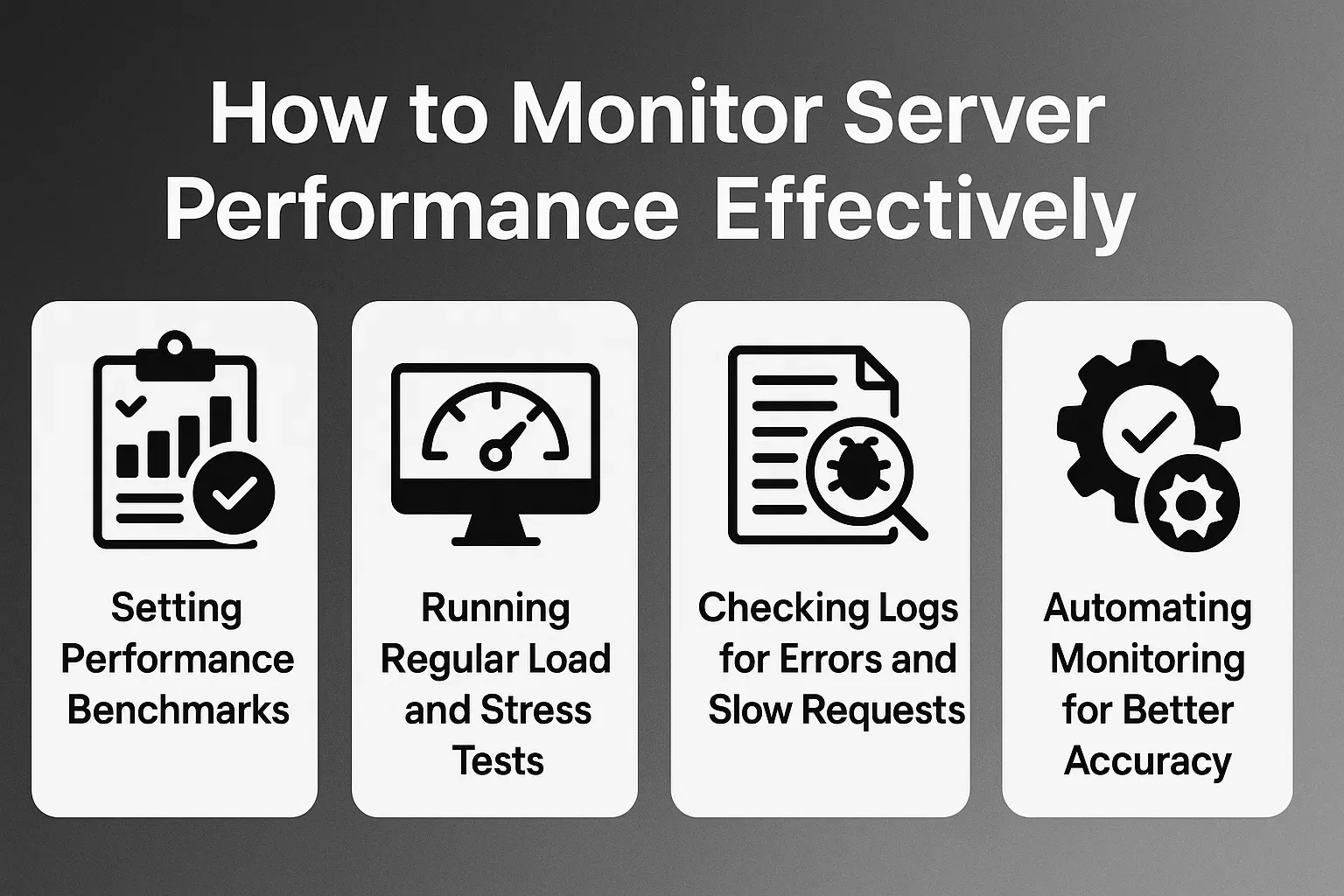
How to Monitor Server Performance Effectively
Effective monitoring depends on clear goals, consistent checks, and reliable tools. Using structured methods helps you detect issues early and maintain strong server performance.
Setting Performance Benchmarks
- Define expected performance levels for CPU, RAM, disk usage, and response time.
- Compare live data with your benchmarks to spot unusual activity quickly.
- Use benchmarks to understand when your server needs upgrades or fixes.
- Keep benchmark ranges updated as your traffic and resource needs grow.
Running Regular Load and Stress Tests
- Perform load tests to see how your server handles normal and peak traffic.
- Use stress tests to push the server beyond safe limits and identify weak points.
- Review test reports to find slow scripts, bottlenecks, and unstable processes.
- Run tests regularly to stay prepared for traffic spikes and seasonal increases.
Checking Logs for Errors and Slow Requests
- Monitor server logs to catch hidden errors you may not see in dashboards.
- Look for repeated slow requests that signal performance problems.
- Track unusual behavior that may indicate security issues or resource overload.
- Use log insights to fix problems early and keep your server running smoothly.
Automating Monitoring for Better Accuracy
- Set up automated alerts for CPU spikes, downtime, or unusual traffic.
- Use automated dashboards to track all major metrics in real time.
- Schedule automatic reports so you always see performance trends.
- Rely on automation to monitor your server even when you are offline.
Common Server Health Issues and How to Fix Them
Servers slow down or fail when key resources run low. Finding these issues early keeps your website smooth and reliable. Understanding the most common problems helps you take quick action before they impact users.
High CPU or Memory Spikes
High CPU or memory use happens when your server handles more tasks than it can manage. Heavy scripts, large applications, or sudden traffic can trigger these spikes. You can reduce the problem by optimizing code, removing unnecessary processes, and upgrading resources when needed.
Slow Response Times
Slow response times usually appear when the server struggles to deliver data fast enough. This can happen due to weak hosting, overloaded applications, or slow databases. Fix the issue by improving caching, cleaning database queries, or moving to stronger hosting.
Storage Running Out
Low storage causes errors, failed updates, and database slowdowns. When your drive is full, your server cannot save logs or process tasks properly. Cleaning old files, removing unused backups, and expanding your storage helps restore performance.
Network Latency Problems
Network delays occur when data travels slowly between your server and users. This may be due to poor routing, overloaded networks, or distant data centers. A CDN, better hosting region, or upgraded network settings fixes most latency issues.
Best Practices for Maintaining Server Health
Healthy servers stay stable when you follow consistent maintenance steps. These practices reduce risks, prevent downtime, and keep performance strong over time.
Update Software and Security Patches
- Keep your server software updated to avoid bugs and security threats.
- Apply patches regularly so your system stays fast and stable.
- Use update schedules to prevent forgotten or delayed maintenance.
- Updated software improves compatibility with new tools and features.
Clean Up Unused Files and Services
- Remove old logs, backups, and temporary files that fill storage.
- Disable services, apps, or scripts you no longer use.
- Cleanup reduces disk pressure and improves server responsiveness.
- A lighter system runs faster and handles requests more efficiently.
Scale Hosting Resources When Needed
- Upgrade CPU, RAM, or storage when your traffic increases.
- Move to scalable hosting if your workload grows often.
- Scaling prevents slow loading and unexpected downtime.
- More resources help your server handle peak usage smoothly.
Monitor Traffic Patterns Regularly
- Track daily, weekly, and seasonal traffic trends.
- Identify spike periods to prepare for higher loads.
- Use traffic insights to plan resource upgrades early.
- Monitoring patterns helps your server speed stay stable under pressure.
When to Upgrade or Change Your Server
Sometimes a server cannot keep up even with proper maintenance. When that happens, upgrading becomes the best choice.
Persistent Performance Bottlenecks
If slowdowns happen often and do not improve with optimization, your server may be underpowered. Upgrading hosting or using a stronger environment helps eliminate bottlenecks.
Frequent Downtime or Overloads
Regular downtime signals that your server cannot carry the load. Stable hosting with more resources or a cloud-based setup prevents outages and improves reliability.
Traffic Growth Beyond Current Capacity
When your business grows, more users visit your site at the same time. If your server struggles during peak hours, it’s time to scale resources or switch to a hosting plan that adjusts with demand.
Conclusion
Monitoring server health and performance is one of the most important steps in keeping your website stable, fast, and ready for consistent growth. A healthy server supports smooth browsing, quick loading, and reliable uptime, which helps users trust your website and stay longer. When you track metrics like CPU usage, memory load, disk activity, and network performance, you can fix issues early instead of waiting for slowdowns or outages.
Share this article